TypeScript SDK Development: A 5-year-old could follow this step-by-step ~ Part 4, Publishing to NPM
Publish your first SDK to NPM
Helloooooooo!
Hope you're doing great! This is SMY! 👋 Let's Jump right in 🚀
This is Part 4 of our SDK development series where we will publish our SDK
Contents:
-
⚡
Creating an NPM account -
⚡
Publishing to NPM, semantic versioning, and LICENSE
Step 1: Creating an NPM account
Head over to https://www.npmjs.com and create an account.
Step 2: Publish
In the terminal write:
npm login
After following the login steps, write
npm publish
This can fail due to duplicate package names or wrong configuration in package.json
Your package.json should look like the following:
{
  "name": "ts-lib-template-starter",
  "version": "1.0.0",
  "description": "SDK development tutorial",
  "main": "./src/index.ts",
  "scripts": {
    "test": "echo \"Error: no test specified\" && exit 1",
    "build": "tsup ./src/index.ts --watch"
  },
  "type": "module",
  "keywords": [],
  "author": "",
  "license": "ISC",
  "devDependencies": {
    "@types/node": "^20.14.8",
    "tsup": "^8.1.0",
    "typescript": "^5.5.2"
  }
}
Congrats you just published your first SDK to NPM 🎉🥳 🚀🚀🚀
Step 3: Semantic versioning
When publishing a library it is good to keep versioning in check. Versioning helps the developer integrate the code to get an idea of what update happened to the SDK. Furthermore, the right versioning will help package managers to update to the level as it is mentioned in their package.json.
To help developers who rely on your code, we recommend starting your package version at 1.0.0 and incrementing as follows:
| Code status | Stage | Rule | Example version |
|---|---|---|---|
| First release | New product | Start with 1.0.0 | 1.0.0 |
| Backward compatible bug fixes | Patch release | Increment the third digit | 1.0.1 |
| Backward compatible new features | Minor release | Increment the middle digit and reset last digit to zero | 1.1.0 |
| Changes that break backward compatibility | Major release | Increment the first digit and reset middle and last digits to zero | 2.0.0 |
Learn more about semantic versioning here: https://docs.npmjs.com/about-semantic-versioning
Step 4: LICENSE
Specify a license for your package so that people know how they are permitted to use it, and any restrictions you're placing on it.
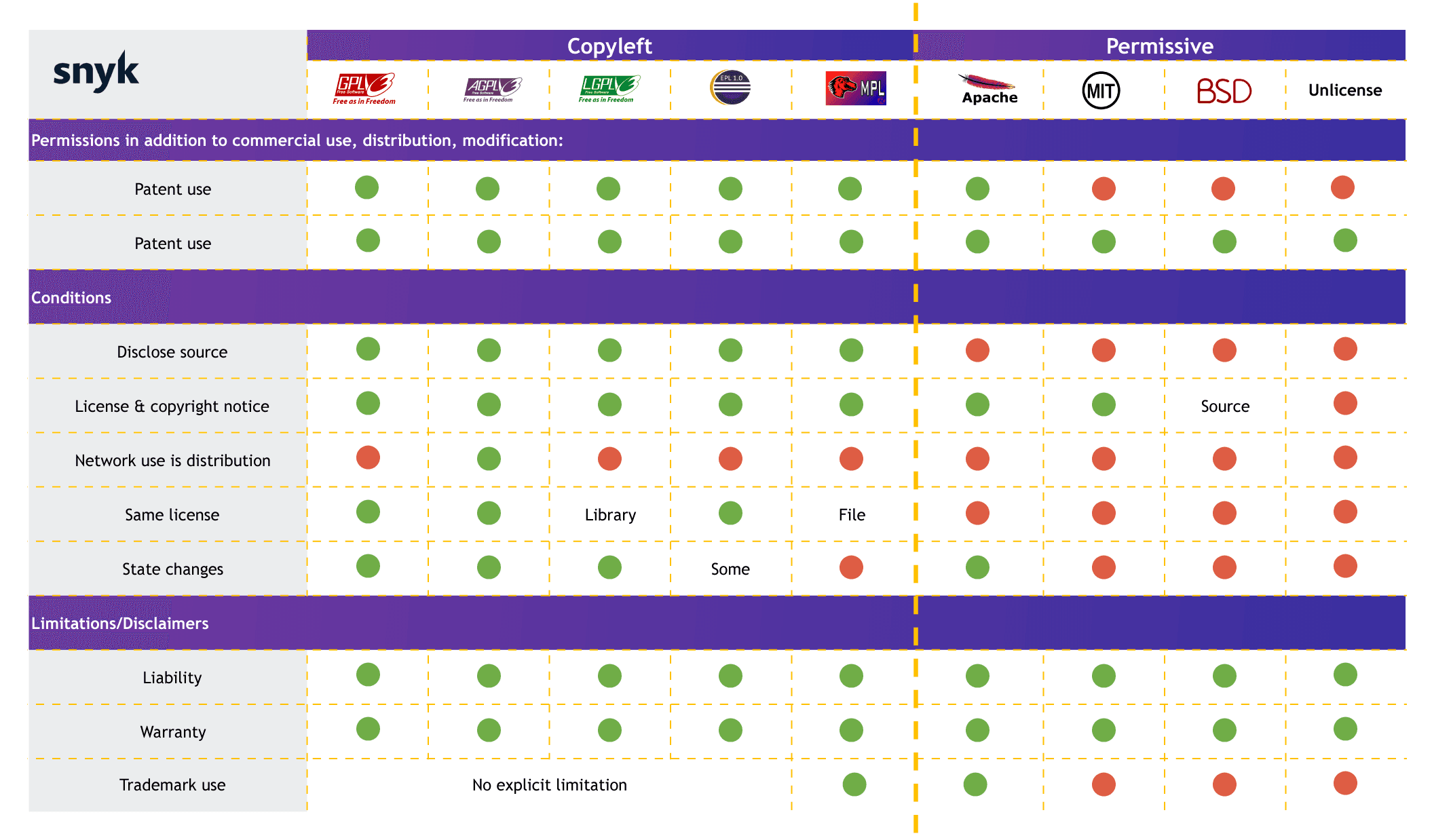
source: https://snyk.io/learn/open-source-licenses/
For example, this SDK is open for distribution and modifying the code so I would use MIT as LICENSE.
In package.json
"license": "MIT"
Learn more about various types of LICENCES here: https://snyk.io/learn/open-source-licenses/
Wrapping Up:
We Just completed the steps to publish our SDK. Head over to Part 5, where we will make a CDN for browsers 🚀
.....
Now you're equipped with the knowledge to publish your own SDK. Happy coding! 🚀
That's it, folks! hope it was a good read for you. Thank you! ✨
👉 Follow me