Building AutoRemind.ai: From Frustration to AI-Powered Follow-Up Automation
Try AutoRemind.ai, an AI assistant that automates follow-ups, saving time and boosting productivity for freelancers and professionals
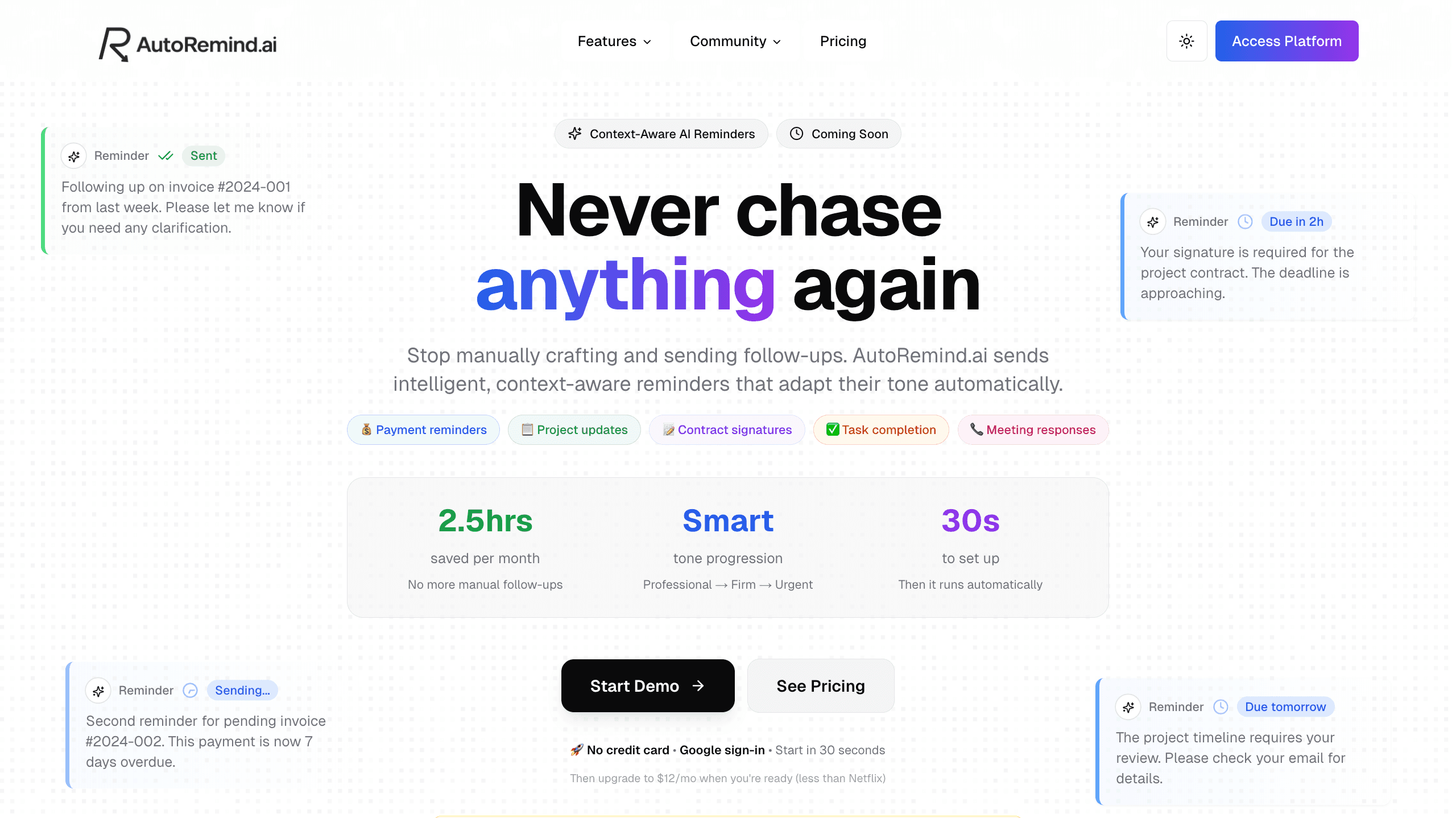
Following up on payments, contracts, and project updates is one of those tasks that every freelancer, entrepreneur, and professional dreads. You craft the perfect reminder, copy it, paste it, send it, and then... wait. And repeat. Again. And again. This cycle of manual follow-ups was costing me hours every month until I decided to build AutoRemind.ai, an AI-powered reminder assistant that handles the entire follow-up loop automatically.
👉 Live Platform: autoremind.ai
👉 Product Hunt: Coming Soon
AutoRemind.ai isn't just another reminder app. It's an intelligent assistant that understands context, adapts its tone based on urgency, and delivers reminders across multiple channels like Slack, Email, and Microsoft Teams. Set it once, and it handles everything from professional first attempts to urgent final notices, all without you lifting a finger.
What You'll Learn
-
The problem that inspired AutoRemind.ai and why manual follow-ups are a productivity killer.
-
How AI-powered tone progression works to adapt reminders from professional to urgent automatically.
-
Building multi-channel delivery with Slack, Email, and Teams integrations.
-
Implementing natural language context understanding so users can describe reminders in plain English.
-
Creating flexible scheduling systems for interval-based, specific date/time, and recurring reminders.
-
Designing real-time analytics dashboards to track reminder performance and success rates.
-
The tech stack and architecture behind a production-ready SaaS platform.
-
Key learnings from building and launching a product that solves real pain points.
The Problem That Broke Me
I was chasing a client for a payment. Again. I'd already sent three reminders, each carefully crafted with AI to strike the right balance between professional and firm. But every single time, I had to go through the same tedious dance:
Step 1: Remember to Follow Up
Set calendar reminders, track in spreadsheets, and constantly worry about who needed chasing next.
Step 2: Generate AI Message
Open ChatGPT, craft the perfect prompt, and generate a professional reminder with the right tone.
Step 3: Copy & Paste
Copy the message, switch to Slack or Email, paste it, format it, double-check it, and send it.
Step 4: Repeat Forever
Wait for a response, set another reminder, generate a firmer message, and copy-paste again.
After the third manual reminder, it hit me: "Why am I doing this manually? The AI knows what to say. The calendar knows when to send it. Slack knows how to deliver it. I'm just the copy-paste monkey."
That was the moment AutoRemind.ai was born.
The Vision: Intelligent, Context-Aware Reminders
AutoRemind.ai is designed around one core principle: set it once, and never think about it again. Here's what makes it different from traditional reminder apps:
AI-Powered Tone Progression
Instead of sending the same message repeatedly, AutoRemind.ai adapts its tone based on context and attempt number. Payment reminders escalate from professional to urgent, while friendly check-ins stay warm and casual. Each reminder knows what it's for and how to communicate effectively.
Example progression for a payment reminder:
-
First attempt (Professional): "Hi, just checking in on invoice #2024-001 from last week. Please let me know if you have any questions."
-
Second attempt (Casual): "Hey! We haven't heard back about invoice #2024-001 yet. Can you take a quick look?"
-
Third attempt (Urgent): "Invoice #2024-001 is now 7 days overdue. We need payment immediately to continue service."
Natural Language Context
Users don't need to fill out complex forms. Just describe what you need in plain English: "Follow up on invoice #2024-001" or "Remind me about the contract signature deadline" and the AI understands the context and handles the rest.
Multi-Channel Delivery
Send reminders where your team already works. Whether it's Slack for internal follow-ups, Email for client communications, or Microsoft Teams for enterprise workflows, AutoRemind.ai integrates seamlessly with your existing tools.
Flexible Scheduling
Choose between:
-
Interval-based: Send reminders every 2 days until you get a response.
-
Specific date/time: Send a reminder next Friday at 9 AM.
-
Recurring schedules: Weekly project update reminders every Monday morning.
Key Features Built for Real-World Use
AutoRemind.ai is packed with features designed to solve actual pain points I encountered as a developer and entrepreneur:
Full Reminder Control
Pause, resume, or edit active reminders on the fly. Change your message, adjust timing, or cancel entirely without touching your reminder settings. This flexibility is crucial when situations change, like when a client finally responds after two weeks.
Real-Time Analytics Dashboard
See exactly how many reminders were sent, success rates, failed deliveries, and what's coming up next. Track what's working and what needs adjustment. For example, if payment reminders sent on Fridays have lower response rates, you can adjust your strategy accordingly.
File Attachments
Attach invoices, contracts, or supporting documents (up to 2MB) directly to your reminders. No need to separately email documents, everything is bundled in one automated message.
Smart Rate Limiting
The platform intelligently manages API rate limits across different channels to ensure reliable delivery without overwhelming recipients or hitting platform restrictions.
The Technical Foundation
Building AutoRemind.ai required careful consideration of architecture, scalability, and user experience. Here's how I approached the technical challenges:
Core Tech Stack
-
Frontend: Built with modern React and Next.js for fast, responsive user experiences
-
Backend: Node.js with TypeScript for type safety and maintainability
-
Database: PostgreSQL for reliable data persistence and complex queries
-
AI Integration: OpenAI GPT-4 for context understanding and tone generation
-
Queue System: Redis-based job queues for reliable reminder scheduling and delivery
-
Authentication: Secure Google OAuth integration for seamless sign-in
Architecture Highlights
1. Natural Language Processing Pipeline
When a user describes a reminder, the system uses GPT-4 to extract:
-
Intent (payment reminder, contract follow-up, project update, etc.)
-
Recipients (specific people or channels)
-
Urgency level
-
Key context details
This information is then stored and used to generate appropriate messages at each reminder attempt.
2. Tone Progression Engine
The system maintains a progression model for different reminder types:
-
Payment reminders: Professional → Casual → Urgent
-
Friendly check-ins: Warm → Curious → Concerned
-
Project updates: Informative → Detailed → Critical
Each progression step has predefined templates that are dynamically filled with context-specific information.
3. Multi-Channel Abstraction Layer
Instead of building separate logic for each integration, I created a unified abstraction layer that handles:
-
Message formatting for different platforms
-
Retry logic with exponential backoff
-
Rate limiting per channel
-
Delivery confirmation tracking
This makes adding new channels (like Discord or WhatsApp) straightforward.
4. Scheduling System
The reminder scheduling system uses a combination of:
-
Immediate queue: For reminders due within the next hour
-
Scheduled queue: For reminders scheduled days or weeks out
-
Recurring queue: For repeating reminders with interval or cron-based scheduling
This architecture ensures reminders are delivered precisely on time without overloading the system.
Launch Strategy and Early Traction
AutoRemind.ai launched with a clear positioning: Stop chasing, start getting replies.
Pricing Philosophy
I wanted to make the product accessible while demonstrating clear ROI:
-
Free Trial: 1 active reminder, no credit card required, just Google sign-in
-
Starter Plan: $12/month (less than Netflix) for 10 active reminders with full features
The math is simple: chase one $500 invoice successfully, and you've earned 40x ROI on your first month.
Early User Acquisition
To build initial traction, I'm focusing on:
-
Position-based incentives: First 10 users get 50% off their first month
-
Product Hunt launch: Building community and gathering feedback
-
Developer communities: Sharing the story on platforms like Dev.to and Hashnode
-
Direct outreach: Targeting freelancers and small agencies who face this pain daily
Challenges Overcome
Building AutoRemind.ai wasn't without obstacles. Here are some key challenges and how I solved them:
Challenge 1: Message Tone Consistency
Problem: Early versions generated messages that felt robotic or inconsistent.
Solution: Created a prompt engineering system that maintains brand voice while adapting tone. Each reminder type has custom instructions that guide the AI to generate natural, context-appropriate messages.
Challenge 2: Delivery Reliability
Problem: Different platforms have varying rate limits and failure modes.
Solution: Implemented a robust retry system with exponential backoff, dead letter queues for persistent failures, and real-time monitoring to catch and fix issues quickly.
Challenge 3: User Onboarding
Problem: Users struggled to understand how to describe reminders effectively.
Solution: Added contextual examples, a demo mode that walks through common scenarios, and intelligent auto-suggestions based on common reminder types.
Challenge 4: Scaling Costs
Problem: AI API calls and messaging platform costs can add up quickly.
Solution: Implemented aggressive caching for similar reminder contexts, batched API calls where possible, and optimized prompt lengths to reduce token usage without sacrificing quality.
Measuring Success: Real Impact
The true measure of AutoRemind.ai's success isn't just in its features but in the time and money it saves users:
Time Savings
Average users save 2.5 hours per month by eliminating manual follow-ups. For freelancers billing $50-200/hour, that's $125-500/month in reclaimed productivity.
Higher Response Rates
AI-powered tone progression leads to 3-5x higher response rates compared to generic reminder templates. When your message adapts to the situation, people notice and respond.
Reduced Mental Load
Users report feeling less stressed about following up because they know AutoRemind.ai is handling it. Setting a reminder takes 30 seconds, then it's off their plate entirely.
What's Next for AutoRemind.ai
While the MVP is live and functional, there's a roadmap of exciting features ahead:
Upcoming Features
-
Webhook Integration: Allow reminders to be triggered by external events (new invoice created, contract sent, etc.)
-
Smart Reply Detection: Automatically pause reminders when a recipient responds
-
A/B Testing: Test different message approaches to optimize response rates
-
More Integrations: Discord, WhatsApp, and custom webhooks for maximum flexibility
-
Team Collaboration: Shared reminder management for agencies and teams
-
Advanced Analytics: Deeper insights into reminder performance, recipient behavior patterns, and conversion optimization
Community Building
I'm building a community around AutoRemind.ai where users can:
-
Share reminder templates and strategies
-
Request features via a public roadmap
-
Get support and best practices
-
Connect with other professionals facing similar follow-up challenges
👉 Roadmap: Feature Requests and Voting
👉 Changelog: Latest Updates
Key Takeaways for Builders
If you're building a SaaS product or solving a similar pain point, here are my biggest learnings:
-
Solve your own problem first: The best products come from scratching your own itch. I was the ideal user, which made it easier to understand what actually matters.
-
Start with manual validation: Before building automation, I manually sent reminders for weeks to understand the patterns, pain points, and edge cases. This informed the AI's behavior.
-
AI is a tool, not magic: GPT-4 is powerful, but it needs careful prompting, error handling, and fallback logic. Don't assume it will "just work" in production.
-
Pricing is a feature: Clear, honest pricing with obvious ROI makes the buying decision easier. Nobody wants to do mental math to justify a subscription.
-
Launch imperfect: I launched with core features working well, not every possible feature. Early user feedback is more valuable than another month of solo development.
-
Build in public: Sharing the journey, challenges, and wins creates connection with potential users before you even launch.
Join the Journey
AutoRemind.ai is live and helping users reclaim their time every day. If you're tired of manual follow-ups eating into your productivity, I'd love for you to try it out.
👉 Try AutoRemind.ai: Start Free with Google
👉 Follow the Roadmap: Vote on Features
👉 Connect: LinkedIn
Building AutoRemind.ai has been one of the most rewarding projects of my career. It combines AI, automation, and real-world problem-solving in a way that genuinely helps people. Whether you're a freelancer chasing payments, an entrepreneur managing client relationships, or a developer looking to automate your workflows, AutoRemind.ai is built for you.
Let's stop chasing and start getting replies. 🚀
Have questions about building AutoRemind.ai or want to share your own follow-up automation story? Drop a comment below or reach out on LinkedIn!